The AI Call Agent holds a real, spoken conversation on your own phone number. It can answer calls you don't pick up (or every call), and it can place outbound calls to a list you choose — qualifying the lead, answering questions, booking a callback, or transferring a live person to you.
It is available on every paid plan, and it runs on a Telnyx number connected in Settings. (Quo and Twilio numbers can't run the AI agent yet — the card only appears on a Telnyx account.)
What it costs
25¢ per AI minute, taken from your prepaid credit balance as calls complete. On top of that, the actual phone minutes bill to your own Telnyx account at their normal rate — the same as any other call you make. There's no monthly fee for the agent itself.
A call needs at least $3.75 of credit (15 minutes) to start. Each outbound call in progress sets aside its own 15 minutes, so two calls at once need $7.50. Below that, outbound calls wait in the queue rather than failing, and incoming calls go to voicemail instead of the AI. A call is capped at 30 minutes and is billed in full when it ends — even if it runs past your balance. If that leaves you owing, the amount comes off your next credit purchase and AI calls pause until then. If it's still owed when your plan renews, the account is paused until you add credits to cover it.
Set it up (Settings → Phone → Calling integration)
Find the AI Call Agent card and press Set up AI answering. Then fill in the persona — this is what the AI actually knows:
- Your business name (up to 80 characters) — the AI introduces itself with this, and it is spoken in a fixed greeting line.
- Goal of the conversation (up to 400 characters) — one clear objective, e.g. "Find out whether they'd sell the lot and roughly what they'd want for it." Write this one. It's what the AI steers toward, and it's what "Converted" is measured against later.
- Questions the AI should try to get answered — up to 10, worked into the conversation naturally rather than read as a checklist.
- Anything else the AI should know (up to 1,000 characters) — tone, what you buy, what to avoid promising.
- Transfer-to number (optional) — the AI offers to connect an interested caller straight to a human.
Keep every field short and plain. One persona is read to every lead, so never write a merge field like a name placeholder into it — it would be spoken out loud, literally.
Choosing when it answers
- Off — don't use the AI
- When I don't answer (after the browser/cell rings) — the usual pick. Your phone rings first; the AI catches what you miss. You can also choose whether the AI takes over immediately or your fallback number is tried first.
- Answer every call immediately — a true receptionist. Note your browser stops ringing for those calls.
What the AI can actually do on a call
- Look up their property. Mid-call it can pull the street, city, parcel number and acreage of the property already on file for that caller — so it can confirm which one you mean.
- Answer the questions you trained it on. Each AI Calls campaign can carry up to 40 question-and-answer pairs (the 🎓 trained answers link on its card, or the Edit campaign form). When a caller asks one, the AI gives your answer in its own words with every fact kept exactly — and it never guesses at a question you didn't train.
- Follow a conversation script. Optionally, an AI Calls campaign can carry a branching script — the 🗺 Conversation script button on its card. After its greeting the AI asks step 1, listens, picks the branch that matches what the person said, and moves to the next step; a path can end with a hand-off (it offers a callback), not interested (it wraps up), mark as qualified, a tag you name, a note on the contact, or turning the AI off for that contact — the ending is recorded on the contact the moment the AI reaches that step. Off-script questions get a brief answer from the trained answers, then it returns to the step.
- Book a callback, which creates a high-priority task for you.
- Transfer to a person, if you set a transfer number.
- Take them off the list immediately if they ask, which also cancels anything still queued for them.
Two limits worth knowing up front: the greeting is one fixed line, so a property reference lands in the AI's first real question rather than the opening sentence; and the lead's name isn't available to the AI mid-call yet, so write the persona to work without it.
Outbound calling — the part with real rules
Outbound is off by default and stays off until the account owner personally ticks "Let the AI place outbound calls" (Settings → Phone → AI Call Agent) and accepts the calling terms that pop up — there's an "Accept the calling terms" link right under that box, and the same terms appear the first time you press Start on an AI Calls campaign or use the CRM's 🤖 AI call… button. The box and the terms are two separate things: the box is the account switch, the terms are the owner's own legal statement, so a teammate can't accept them. That isn't a formality:
- The FCC treats an AI voice as an artificial voice under the TCPA. Outbound AI sales calls need prior express written consent from the person you're calling.
- Penalties run $500–$1,500 per call.
- Washington is blocked outright. Calls only go out 8am–9pm in the lead's own local time (8pm in Florida and Oklahoma).
- Scrubbing your list and holding consent are your responsibility. DirectREI blocks what it can see — DNC and litigator flags, opt-outs, bad numbers, per-contact AI toggles — and reports every skip honestly.
Never point the AI at a purchased or scraped list. This is the one feature where getting it wrong is expensive rather than just ineffective.
Running an outbound campaign
- Create a campaign with the AI Call channel. It needs no sequence — the persona does the talking.
- Give that campaign its own goal, questions and notes if it should sound different from your account default (a rental-referral campaign and a land-buying campaign shouldn't open the same way). Blank fields inherit the account persona; changes apply from this campaign's next outbound call.
- Train its answers — the 🎓 link on the campaign card opens a list of "if they ask X, say Y" pairs. This is where objection handling and FAQs belong, not the notes field. They apply from this campaign's next outbound call (the inbound receptionist uses the account persona). The platform rules still win — a trained answer that promises a guaranteed price gets softened to "a person confirms the specifics".
- Give it a script (optional) — the 🗺 button on the campaign card opens a flowchart: what the AI says first, then "If they say…" branches to the next line. Leave it empty and the AI works from the goal and questions as before. It applies from this campaign's next outbound call; the platform rules still win (a second decline ends the call even if steps remain).
- Enroll contacts from the CRM — select them, then Add to campaign.
- Open Voice Outreach → 🤖 AI Calls and press Start AI calls. Pause or cancel pending calls from the same card.
Continuous calling: the ⟳ Continuous button on the campaign card makes the campaign call new people automatically — anyone added to it (from the CRM, an import, a website form, the API, Oliver or an automation) is queued the moment they join, with the same skips as Start (opted-out, DNC, litigator, already called). People already in the campaign aren't affected; press Start for them. Edits to the campaign's persona, trained answers or script reach its next call by themselves.
Which of the lead's numbers: edit the campaign and set Lead numbers — the main number (line 1, the default), line 2 only, line 3 only, or All numbers, one after another. In that last mode, a call to one line that nobody answers (or a voicemail) — or one where the AI reaches the wrong person — queues a call to the lead's next line about 5 minutes later, inside calling hours. It stops as soon as they answer, text back or reply, and a number that reached the wrong person is marked on the contact card so nothing calls it again.
For a handful of leads instead, select them in the CRM and use 🤖 AI call… in the bulk bar. Calls dial a couple at a time, inside legal hours — a big list drains over hours, not minutes.
Reading what the calls produced
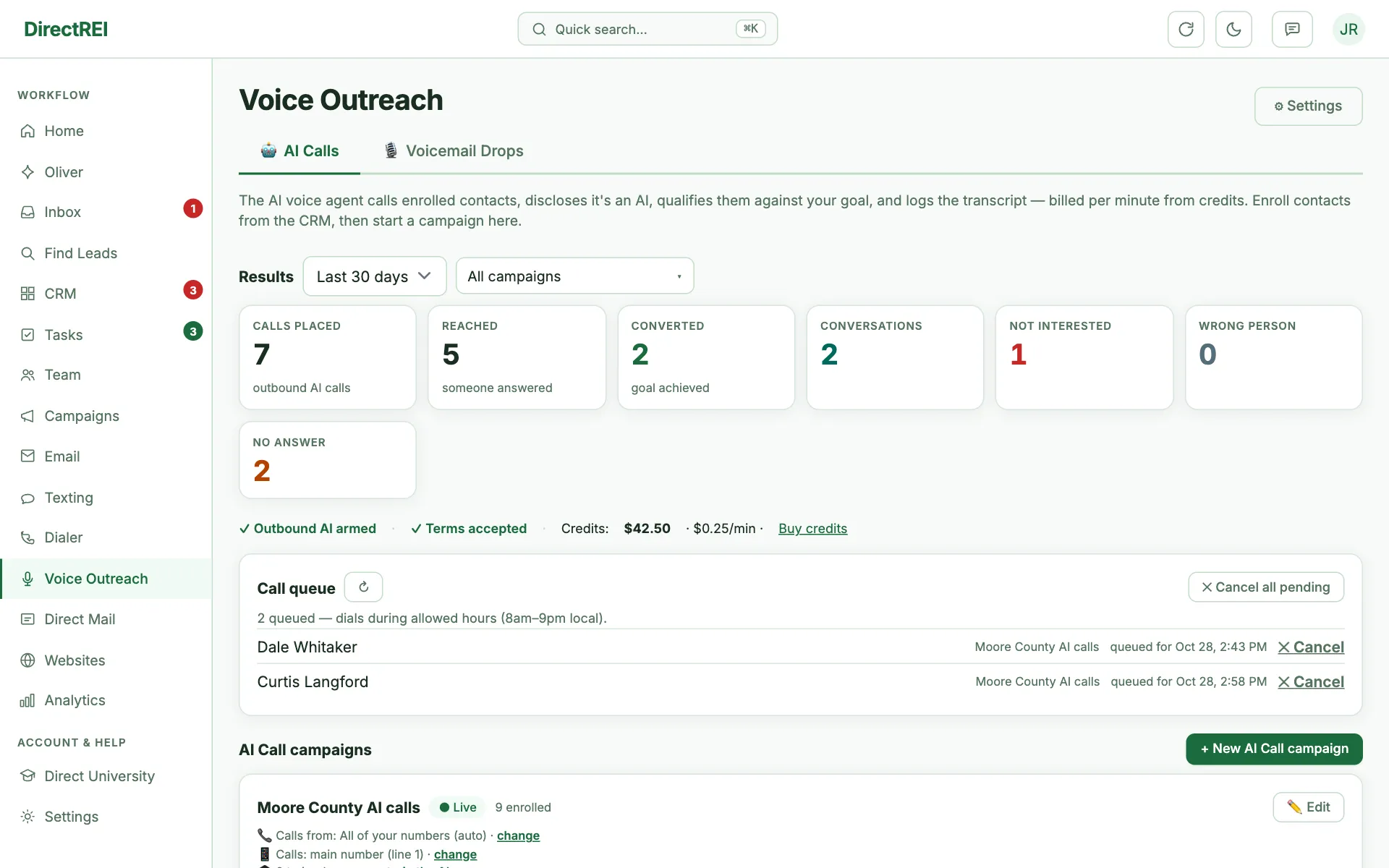
The campaign card shows two different things, and the difference matters:
- The pipeline line — Queued, Calling now, Called, No answer, Skipped, Failed. This is delivery: did we get through the list.
- The results line — every completed call classified as Converted, Conversation, Not interested, Wrong person, or No answer. This is what happened.
Converted means the AI achieved the goal you wrote, or a concrete win landed — a callback booked, or a transfer to a person. This is why the goal field matters: a campaign with no goal written can only ever convert on those concrete wins, and the card will tell you so rather than showing a bare zero.
Each call also lands on the contact's timeline with an outcome chip, the AI's summary, and the recording or transcript where available. Analytics has AI Call Outcomes and AI Call Conversion Rate widgets — the rate is measured against calls that actually reached a human, so a list full of dead numbers doesn't flatter it. The call export carries the outcome too.
Ask Oliver "how did my AI calls go this week?" and it will read the same breakdown back to you, including which bucket is leaking.
Turning outcomes into work automatically
Tasks → Automations has an "An AI call is classified" trigger. Filter it by outcome (and optionally by campaign) and attach any action — the common one is AI call converted → create a deal, so a good conversation lands in your pipeline without anyone watching the queue. It fires when the outcome lands, and again only if that outcome is later refined (a call first read as a conversation, then confirmed as converted) — the task dedupe keeps that from creating a duplicate.
What it will never do
- Leave a voicemail. If a machine answers, it hangs up — an AI voicemail is itself an artificial-voice message, and that's the exposure the rule exists to avoid.
- Hide what it is. Every call opens by disclosing it's an AI and may be recorded, and it answers truthfully if asked. That line is enforced by the platform and isn't editable.
- Run forever. Calls cap at 30 minutes, and it hangs up after about 20 seconds of silence.
Where to look when something seems off
- Nothing dialed? Check the campaign isn't paused, that outbound is enabled and the calling terms were accepted (the Settings card and the Voice Outreach page both say which of the two is missing), that credits cover at least a minute, and the local time where your leads are — out-of-hours calls wait, they don't fail.
- Lots of Skipped? That's compliance doing its job. The reason is on the row: opted out, DNC or litigator flag, bad number, or the AI turned off for that contact.
- Everything says No answer? Your list is the problem, not the AI — skip trace for better numbers before spending more minutes.
- Converted stuck at zero? Check the campaign has a goal written. Without one, only a booked callback or a transfer can count.