This is the biggest lead source in Direct REI, and the one most people underuse. Find Leads → Property Records searches nationwide county parcel data — every parcel, its owner, and where that owner gets mail — and imports the owners you choose as seller contacts with their properties attached.
It's the opposite of AI Research. AI Research goes looking for businesses (builders, investors, agents). Property Records queries public ownership data, so it's how you build the "who owns vacant land in this county" list that cold outreach actually runs on.
1. Pick your counties
Choose a state, then a county — it's added the moment you pick it, and you can stack several. County is the unit these records are organised by, so a search always starts here.
2. Filter down
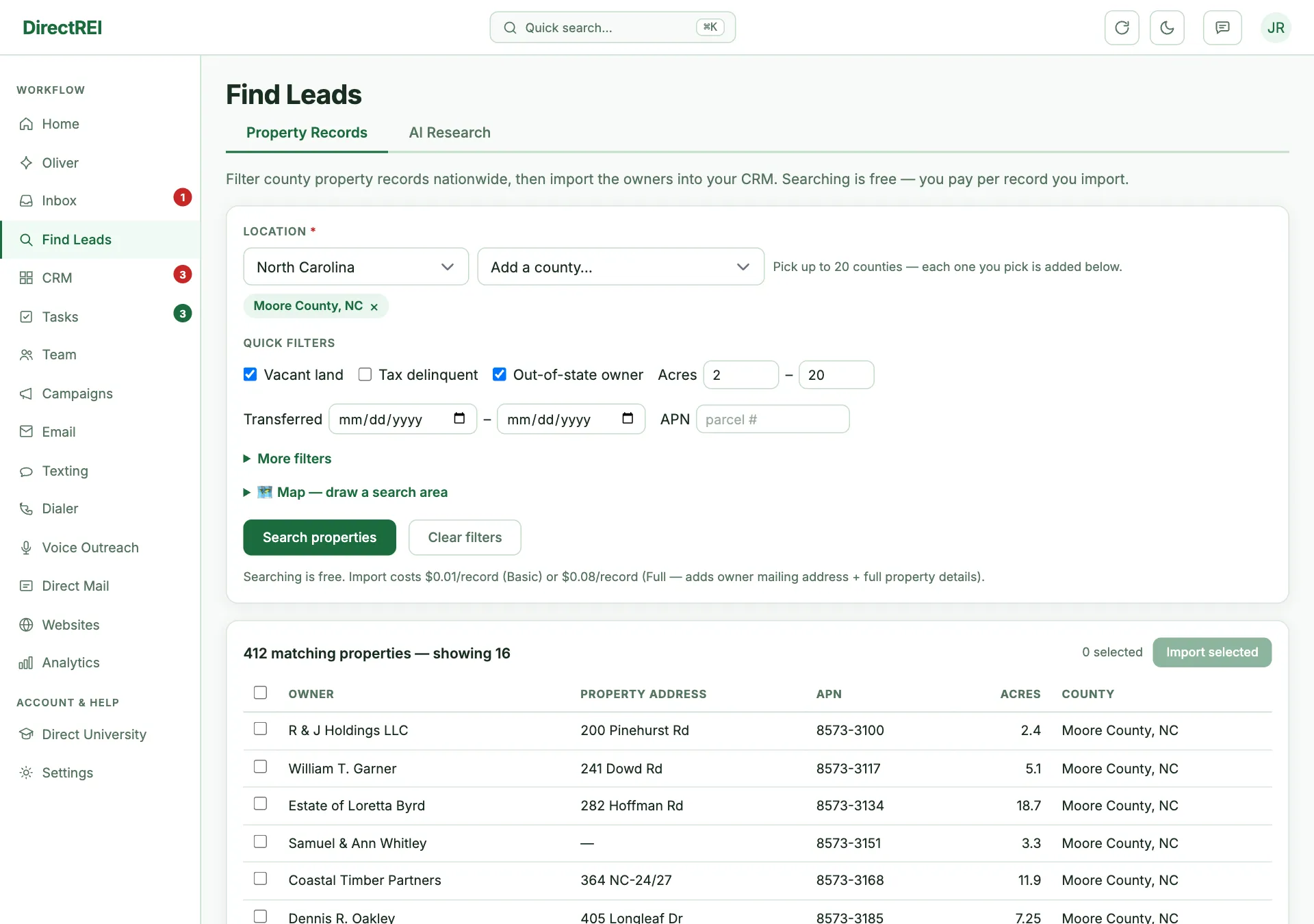
Five quick filters sit at the top because they're the ones land buyers use constantly:
- Vacant — no structure. The core land-investing filter.
- Tax delinquent — behind on property taxes. The strongest distress signal in the data.
- Out-of-state owner — the owner's mailing address is in a different state from the property. Absentee owners are less attached and easier to reach with a real offer.
- Acres — a size range.
- Transferred — when the parcel last changed hands (the county-recorded date of its most recent sale or transfer deed). Fill either side: set only the before date to find long-held owners — say, everything last transferred on or before a date years back — or only the after date for recent buyers. One honest caveat: parcels with no recorded sale date at all drop out while this filter is set, and in some counties that's a meaningful slice.
More filters opens the full set — around a hundred, grouped by topic: property characteristics, valuation, ownership, sale history, and so on. Options load when you open a group.
The map
Below the filters, 🗺 Map opens a map panel for drawing a search area: click Draw search area, then click the map to drop the corners of any shape — click the first corner (or double-click, or press Finish shape) to close it; Undo corner or Backspace takes the last one back. You can also drag to draw a quick rectangle, or use Use current view. Your next search is limited to that area — a "Search area set" chip appears next to the Search button until you clear it. This is the easiest way to target one part of a county — a river bottom, one side of a highway, the edge of town.
Your imported records are pinned on the CRM map (CRM → Sellers → 🗺 Map). Records with a street and a city/state or ZIP are located automatically in the background (free, every 15 minutes) — or press 📍 Locate by address there to do it right away.
3. Select what you want
Results come back 100 at a time with a running match count. Tick rows individually, or use the header checkbox to select every match — that walks the remaining pages for you (a big selection genuinely takes a few seconds, and it tells you where it's up to).
- You can select up to 2,000 records per import.
- Records already in your CRM are marked In CRM and skipped — you're never charged twice for the same parcel, so re-running a search you've already imported is safe. That covers Full imports still processing, too.
- Because dupes are skipped, ticking "select all" again after an import picks up the next batch of net-new records rather than the same ones.
4. Choose Basic or Full — this is the important decision
Both tiers are charged per record against your credit balance, pay-as-you-go:
- Basic — $0.01/record. Owner name, property address, parcel number, county, acreage. Imports immediately.
- Full — $0.08/record. Everything in Basic plus the owner's mailing address and around 60 property fields — beds/baths, values, taxes, legal description, flood zone. Delivered in the background, usually 5–15 minutes; a Full imports card tracks progress.
Which is why the mailing address matters so much. Skip tracing works from the owner's address, and only Full includes it. You can trace a Basic record — it falls back to the property address — but for an absentee owner that address is where the land is, not where they live, so results are noticeably worse. The import screen warns you about this when Basic is selected.
So, in practice:
- Mailing a postcard, or skip tracing for phones? Full. You need the mailing address either way.
- Just sizing up a county before committing? Basic. 500 records costs $5 and tells you what's actually there.
- Imported Basic and now want the rest? Ask Oliver to upgrade those records — he can top them up to Full for the 7¢ difference. Re-importing them yourself won't work: they're already in your CRM, so they'd be skipped as duplicates.
5. Import
The import dialog lets you attach a campaign and tags as they land — do it here, because tagging by county and pull date is what makes the list workable later. You'll see the exact cost against your current balance before anything is charged, and one more confirm after that.
Either tier can also tick auto skip trace. On a Full import, owners are queued for tracing as their mailing addresses arrive — the accurate way. On a Basic import the trace runs off the property address instead (Basic records carry no mailing address), which is often inaccurate for absentee owners — the import window warns you before you choose. Both paths trace only newly-created owners this import added, and only when there are trace credits to cover it — no surprise charges. You can also chain the DNC & litigator scrub onto either (1 extra credit per phone found).
Each record becomes a seller contact with a linked property, sourced as "Property Records". Owners of several parcels are folded into one contact with all their properties attached.
What it costs, end to end
The honest arithmetic for 1,000 records you intend to call:
- Full import — $80
- Skip tracing those owners — separate trace credits (see Skip tracing)
- Then texts, calls, or postcards on top
That's why filtering hard beats importing wide. A thousand well-filtered records will out-produce ten thousand loose ones, and cost a tenth as much to work.
What's next
Turn addresses into phone numbers with Skip tracing. Then Build & launch a sequence to work the list, or Direct mail 101 if you have mailing addresses and no phones. To have this done for you end to end, ask Oliver.