Replies arrive on every channel at once — an email answer, a text back, a voicemail, a missed call. The Inbox page pulls them into one screen so nothing sits unanswered because you were looking at the wrong tab.
The layout
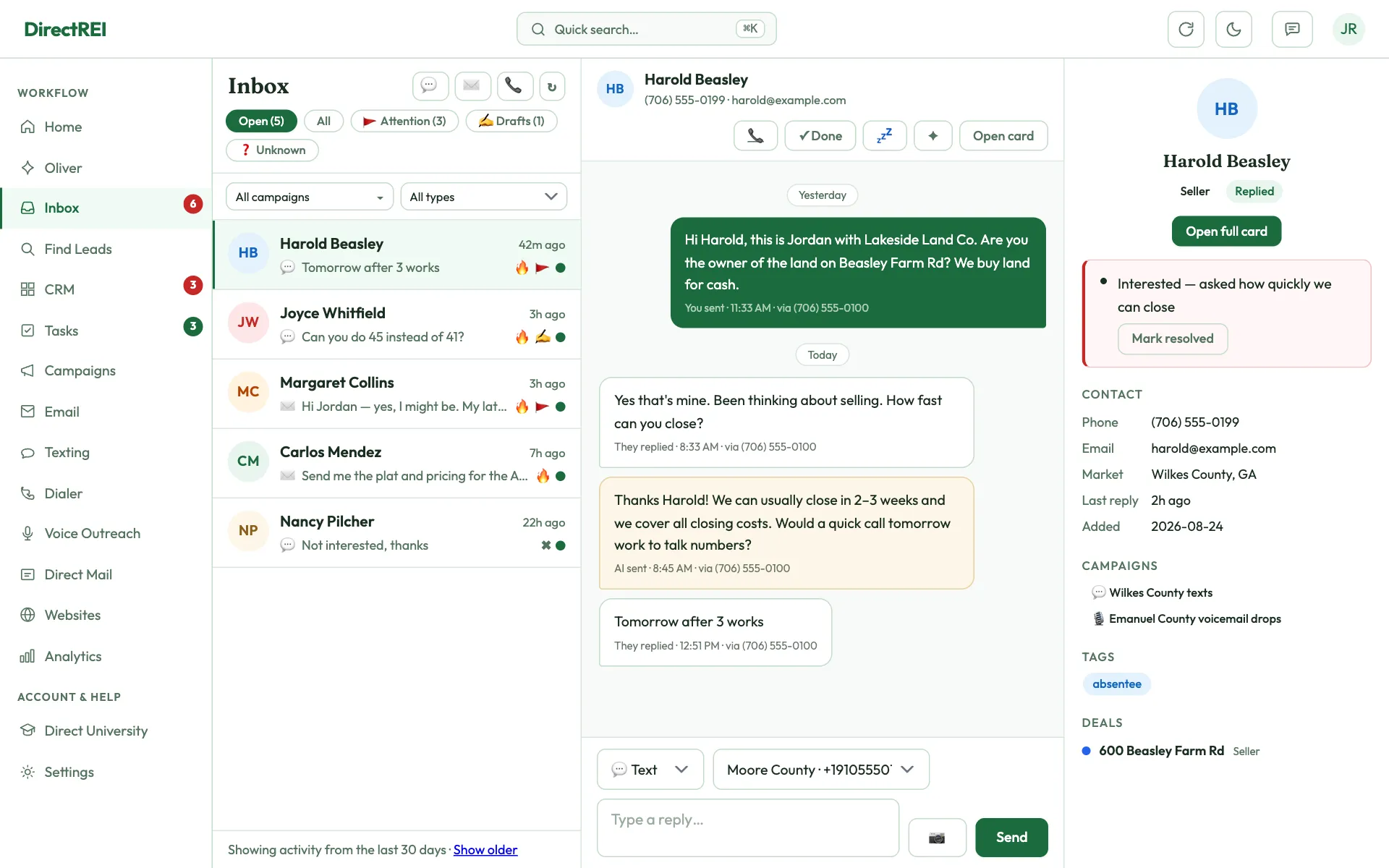
Three panes, left to right:
- Left — the conversation list. Lane filters across the top, then one row per conversation with the contact's name and a one-line preview.
- Middle — the thread. The full back-and-forth as chat bubbles (email and SMS both), with voicemails folded in as playable cards. A reply box sits at the bottom.
- Right — the contact panel. Read-only: stage, campaigns, deals, phone, email. Open full card jumps to the editable contact record.
On a phone the panes stack — tap a conversation to open the thread, and a back arrow returns you to the list.
The lanes
- Open — conversations where they spoke last. This is your to-do list. Replying closes the thread automatically; a new inbound message re-opens it.
- ↩ Replied — everyone who texted or emailed you back, called and missed you, or left a voicemail in the window, newest first, plus anyone you set to Replied by hand — as long as you have a text or email conversation with them in the window (contacts with no messages don't show here; find them in the CRM). Unlike Open, a thread stays here after you answer it or mark it handled, so it doubles as your list of leads who responded. A green dot marks the ones still waiting on you. Automatic replies (out-of-office) don't count.
- All — every conversation in the window, answered or not, with a green dot marking the still-open ones. Use it to find a thread you already handled.
- 🚩 Attention — contacts the system flagged red: an opt-out request, a complaint, a specific deal, or a call-back ask. Voicemails and missed calls show up here even though they have no message thread.
- ✍️ Drafts — AI-written replies waiting on your approval (paid plans). Same approve/skip actions as the topbar Drafts button, just in context with the thread above them.
- ❓ Unknown — texts from numbers that match no contact. See below.
- 💤 Snoozed — threads you deferred. Only appears when you have some.
Lanes show live counts, and the left-nav Inbox badge sums the ones that need you.
Missed calls and voicemails from your contacts show as their own rows (📞 / 🎙️) in Replied and All. Click one to open that contact with the text box ready, so you can text them back. Calls from numbers that aren't in your CRM don't show here.
Filter by type: the All types dropdown above the list has a checkbox for Texts, Emails, Missed calls, and Voicemails. Untick what you don't want to see — every lane and its count follow it. Show all types (or Clear) puts everything back.
Filter by number or email inbox: with more than one number or mailbox connected, the All inboxes dropdown lists each one. Pick one to see only its conversations — texts, missed calls, voicemails and group texts on that number, or the emails sent from or received in that mailbox. Lane counts follow it, and New text / New email start from it. Clear shows everything again.
Replying
Type in the box at the bottom of the thread and send — it goes out on the same channel the lead used, from the right mailbox or number, with all the usual guardrails applied (opt-out checks, texting consent, no sending from a disconnected mailbox).
If the contact has more than one number or you have more than one mailbox, a From picker appears so you can choose which one it goes out from. Sending here does not enroll anyone in a campaign or schedule follow-ups — it is a one-off human reply.
Pictures work both ways on text threads. When a lead texts you a photo (the property, the deed, a handwritten note), it appears right in the thread as an image you can click to open full size — this works on every text composer in the app, not just the Inbox. To send one back, click the 📷 button beside the message box on the SMS channel: JPEG, PNG, GIF, or WebP, up to 3 pictures of 5MB each per text. Picture messaging (MMS) needs a connected Telnyx or Twilio number — Quo lines and the Messages-app handoff are text-only here — and carriers bill MMS at a higher per-message rate than plain SMS on your own provider account.
Starting a new conversation — or a call — from the Inbox
The three small buttons at the top of the conversation list start something new instead of answering something old:
- 💬 New text and ✉️ New email open the same window. Type a contact's name to pick them, or type a phone number or email address directly — an address nobody in your CRM has is saved as a new contact first (give it a name and a lead type), so their reply lands in your CRM instead of vanishing. Pick which of your numbers or mailboxes it goes out from, then Start: the conversation opens in the Inbox with that From already selected, and you write the message in the normal reply box (subject line for email, 📷 pictures for text, every guardrail applied).
- 📞 Call pops up a keypad. Tap or type any number — if it matches a contact, the call is logged to them and you can jump straight to their conversation. Calling from lets you choose the number you dial out from on that call alone; it never changes the Dialer's own setting. That choice is only offered for in-browser calling — a desktop phone app or Quo picks its own line, and the window says so.
Group texts
When someone adds your number to a group text — a seller with their spouse, a buyer with their partner, a family selling an inherited house — every message from anyone in it lands in one shared conversation in the 👥 Groups lane, with each message labeled with who sent it. Group conversations also show in Open while someone is waiting on you.
- The AI never answers a group text. One bot reply would reach everyone in it, so the person who wrote is marked Replied and flagged for you instead, and nothing is queued for the AI.
- Reply to everyone or to one person. The Everyone in the group picker above the reply box sends one group text to all of them. Pick Only <name> — privately to answer one person in your normal one-on-one conversation with them.
- Someone who opted out blocks the group reply. If anyone in the group has opted out of texts, you can't text the whole group — reply to the others privately.
- Start one yourself with the 👥 button at the top of the conversation list: add 2 to 8 people (contacts or typed numbers), pick which of your numbers it comes from, give it a name if you like, and write the first message.
- Rename a group or mark it ✓ Done from the top of the conversation. A contact's card lists the group texts they're in.
Texts from numbers you don't know
An inbound text from a number with no matching contact used to vanish. Now it lands in the ❓ Unknown lane, where you can:
- Add to CRM — creates a contact with that number attached, so every future text from them threads normally.
- Link to an existing contact — for when a lead texts you from their cell instead of the number you had. The past texts get replayed onto that contact's timeline, keeping the history intact.
- Dismiss — for spam. (To stop them entirely, see Block spam callers & texters.)
Marking handled & snoozing
- ✓ Done hides the thread from Open. A new inbound message always brings it back. Once clicked, the button turns into ↩ Mark as open — click it to undo. If Done cleared a red flag, Mark as open brings the flag back too, as long as you haven't reloaded the page since.
- ↩ Mark as open also shows on any conversation that isn't in Open — including one where you sent the last message — and puts it back in Open. Your next reply takes it out again, just like answering a new message.
- 💤 Snooze hides it until a date you pick, then it re-opens on its own. Good for "circle back in two weeks."
- Snoozing defers — it does not clear a red attention flag. Opt-out flags in particular are never cleared by handling a thread, because they are a compliance record.
- Bulk cleanup: the footer can mark everything older than 7 days as handled in one click.
A workable daily rhythm
- Open the 🚩 Attention lane first — those are the ones with money or legal risk attached.
- Clear ✍️ Drafts — read each AI reply, approve the good ones, rewrite the rest.
- Work Open top to bottom until it's empty.
- Sweep ❓ Unknown — add real people, dismiss spam.
What's next
To decide what the AI should answer on its own: When AI replies vs when you should take over. To turn a reply into follow-up work automatically: Automations.